KlassApp is open source and self-hostable. MIT licensed.

Open-source agentic school protocol

The school platform that operates in the tools educationists already use.

Toshi orchestrates WhatsApp, Drive, Slack, and email: one AI agent built for how schools actually work.

Free and open (MIT) Self-hostable MCP-compatible

Connected

MIT · Open Source Self-hostable MCP-compatible KlassApp-Foundation/KlassApp ↗

Works with what you already use

KlassApp doesn't replace your tools. It connects them into a single intelligent layer.

Toshi · Connector Orchestration
6 active
Connector Latest activity Today Status
WhatsApp
Fee reminder sent to 24 parents · P.4 group
142 msg
Live
Google Drive
Weekly report uploaded to /reports/term-2/
8 files
Sync
Slack
#staff-alerts · 3 absences flagged for review
12 posts
Live
Email
Newsletter draft ready for headteacher approval
1 draft
Queue
SMS
SMS fallback for 2 parents without WhatsApp
2 sent
Live
Calendar
Parent-teacher meetings scheduled next week
18 events
Sync
WhatsApp
Drive
Slack
Email
SMS
Calendar
AI Agent

Meet Toshi. Your school's AI agent.

Not a chatbot. An action-taking agent that understands education workflows and orchestrates across every connected tool.

Human in the loop

Before consequential writes, Toshi asks for confirmation. You approve, then it acts. Creation tools stay on an explicit Yes/No gate so a person remains in control.

Role-Aware

Toshi adapts its responses based on who's asking: teacher, parent, admin, or student. Each role gets exactly what they need.

Multi-Channel

Works across WhatsApp, email, Slack, SMS, and the dashboard simultaneously. One agent, every channel your school uses.

Action-Taking

Doesn't just answer questions: sends messages, generates reports, updates records, and schedules follow-ups automatically.

Context-Aware

Remembers term dates, student histories, school policies, and communication patterns. Every interaction builds on the last.

Extensible

Connect new tools through MCP servers or custom connectors. Toshi's capabilities grow with your school's needs.

Safe by Design

Role-based access, audit trails, and human-in-the-loop approvals. Toshi never acts without clear boundaries and oversight.

How it works

One protocol layer. Toshi orchestrates WhatsApp, Drive, and Slack as a single connected system, so every role sees the same school through the channel they already use.

Toshi on top of KlassApp WhatsApp, Email, Slack, SMS, Drive and Calendar feed the KlassApp core. Toshi sits above it and acts for parents, teachers and admins.
WhatsApp
Email
Slack
SMS
Drive
Calendar
Parent
Teacher
Admin
Runs on AnthropicOpenAIGeminiGrokKimiGLM
01
Parent on WhatsApp
01 Fee reminder

Through the WhatsApp connector, Toshi sends a gentle fee balance reminder in the parent's preferred language, with a payment link.

02 Absentee alert

When a child is marked absent, Toshi messages the parent on WhatsApp and relays any reply back to the teacher dashboard, keeping both sides on the same protocol path.

03 Protocol path

One connected flow: WhatsApp → SMS fallback → Dashboard notification → Teacher update.

02
Teacher
01 Attendance summary

From the dashboard, Toshi compiles daily attendance, identifies patterns, and drafts absence follow-ups for teacher review before the protocol sends them.

02 Report generation

End-of-term reports are auto-generated from grade data, reviewed by the teacher, stored in Drive, then delivered to parents on email and WhatsApp.

03 Protocol path

One connected flow: Dashboard input → Google Drive storage → Parent delivery → Archive.

03
Admin on Dashboard
01 Weekly digest

Toshi generates a weekly school summary (attendance, fees, communication metrics), emails leadership, and files the same packet to Drive in one orchestration.

02 Term planning

Before each term, Toshi prepares enrolment projections, staffing suggestions, and fee structure recommendations from historical data, ready to share across Slack and the dashboard.

03 Protocol path

One connected flow: Multi-source data → Analysis → Slack alert → PDF report → Calendar event.

Real screenshots from the app

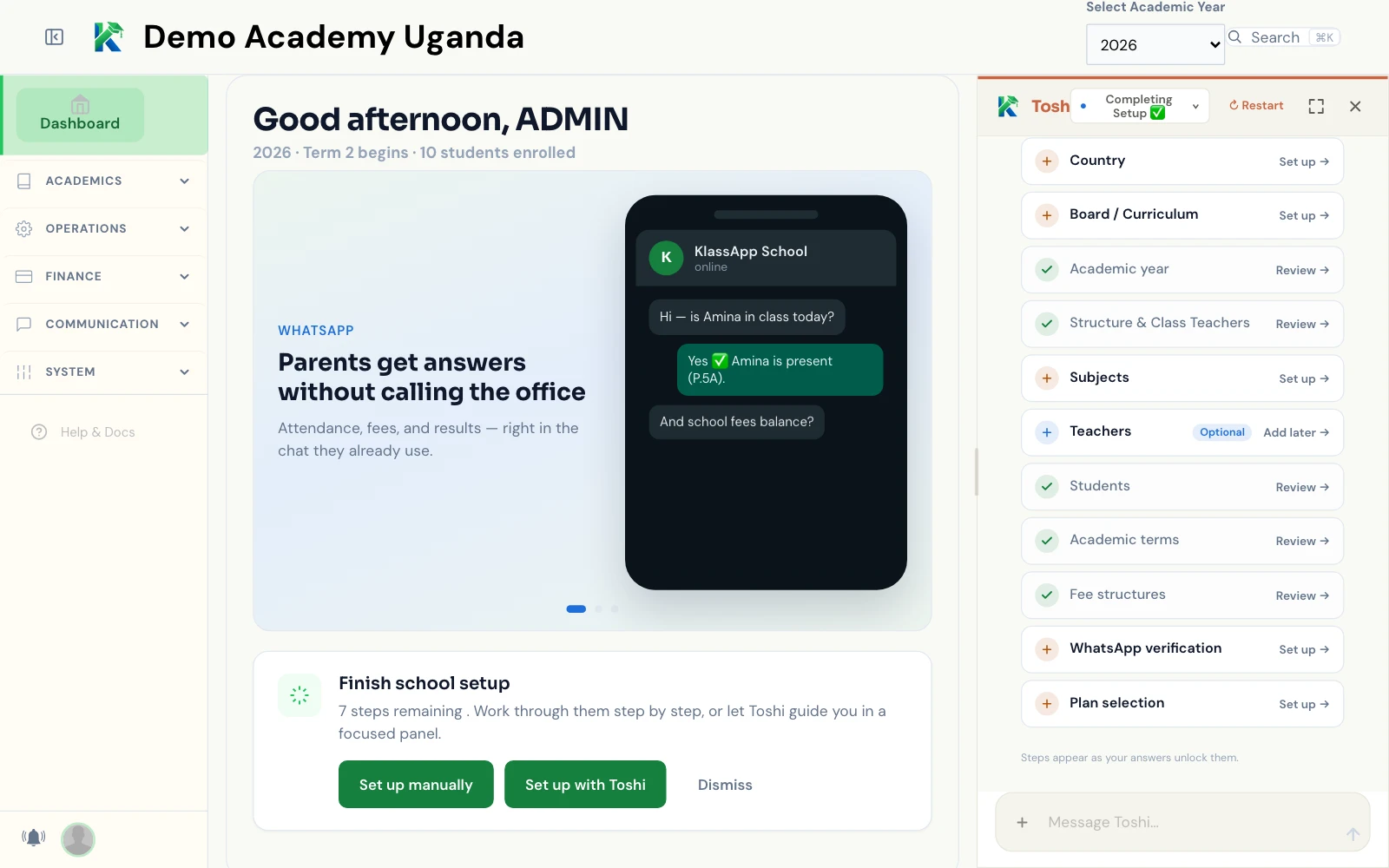
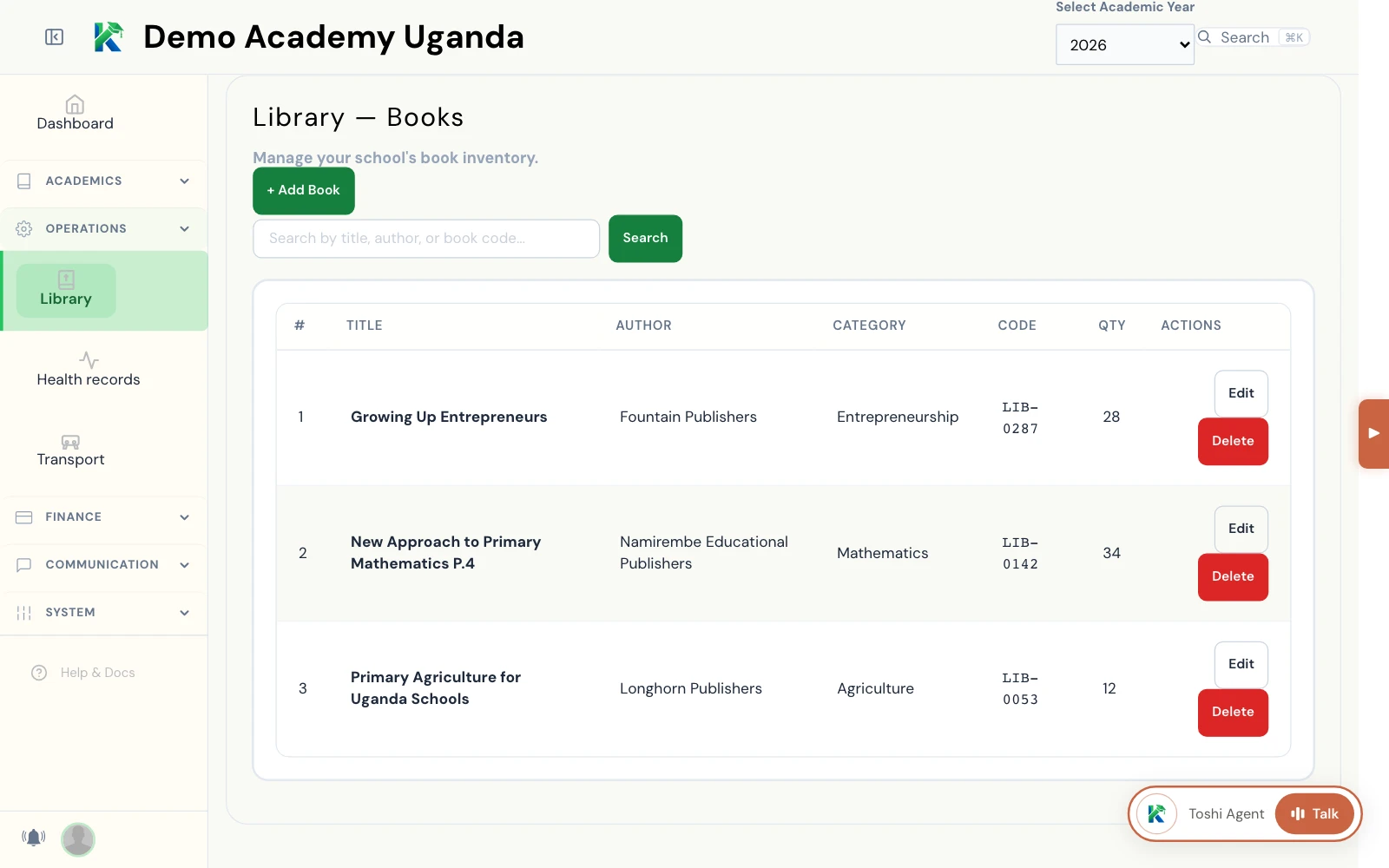
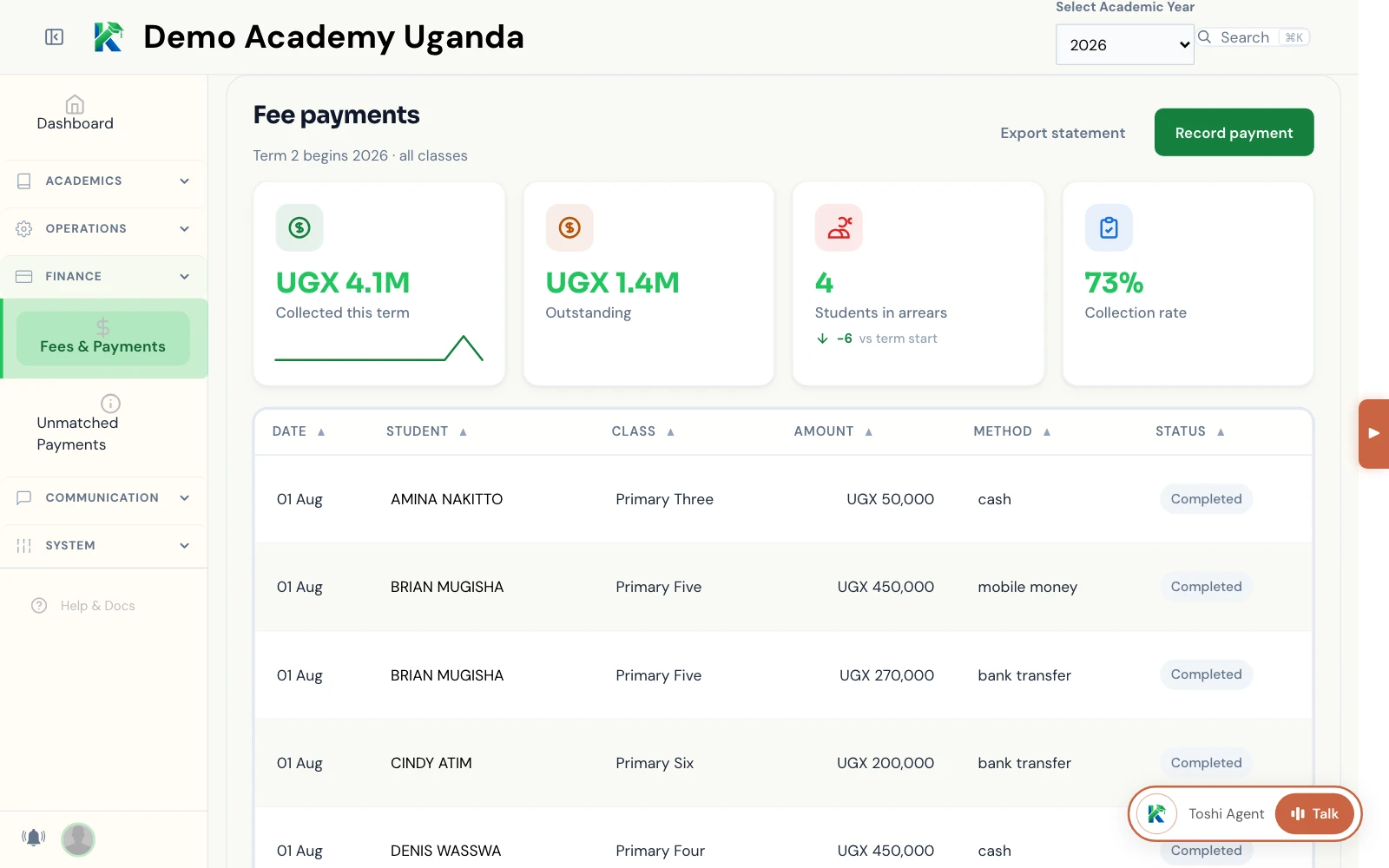
Captured from a local KlassApp instance: the actual dashboard, a records module, and the Toshi assistant.

KlassApp · Dashboardklassapp.xyz/admin/dashboard
KlassApp school-admin dashboard for a demo school: term and enrolment summary, a WhatsApp feature card, the Finish school setup checklist, and the Toshi panel listing each setup step
KlassApp · Library recordsklassapp.xyz/admin/library/books
KlassApp library books page: a searchable table of school textbooks with title, author, category, code and quantity
KlassApp · Fees & paymentsklassapp.xyz/admin/fees/payments
KlassApp fee payments page: amounts collected and outstanding, students in arrears and collection rate, above a table of payments by student, class, amount, method and status
Protocol Cores

Built the way real infrastructure should be

Five commitments that shape how KlassApp is built: four live platform primitives, and one honest forward direction.

Secure

Protected by design

Your school's data is protected by design, not by promise. Access controls are built into the platform itself, not added as an afterthought.

Scalable

Grows with your school

KlassApp runs on modern cloud infrastructure that grows with your school, from a single classroom to an entire district, without anyone having to manage a server.

Private

Scoped by default

Parents see only their own children. Teachers see only the students in their own classes. These are not settings you have to configure. They are the platform primitives.

Interoperable

Tools you already use

KlassApp connects to the tools your community already uses: WhatsApp, Drive, Slack. No need to learn new tools.

Provable Coming

Cryptographically verifiable records

Student records are recorded progressively, term by term, year by year. We're building toward records that are cryptographically provable, so a transcript can be verified as authentic without anyone having to take our word for it.

Stated direction. Not a live feature yet.

What we actually address

Illustrative of real product capability. Not sourced from a named school.

Before

Fee reminders mean phone calls and follow-up visits

KlassApp way

Automated reminders on WhatsApp, email, or Telegram, whichever channel your parents already use

Before

Report cards are printed and sent home, sometimes lost along the way

KlassApp way

Parents get results the moment marks are finalized, on their connected channels

Before

Setting up a new term means days of spreadsheet work

KlassApp way

A guided setup configures classes and streams in minutes, through any connected channel

Before

Every setup step means filling out forms, one field at a time

KlassApp way

Just tell Toshi what you need, in plain language, and it does the rest

FAQ

Do parents need to download an app?

No. Everything works through WhatsApp, a tool most families already use every day.

What if our school doesn't have separate class streams?

KlassApp works the same way whether your school has one class per grade or several streams. Streams are entirely optional.

Is our students' data safe?

Yes. Access is limited by design. Parents see only their own children, teachers see only their own students.

Can we try it before committing?

Yes. KlassApp has a free tier so you can set up your school and see how it works before choosing a paid plan.

Not just software. A protocol.

KlassApp is open infrastructure: designed to be extended, self-hosted when we open source, and shaped by the education community.

Open Source

MIT licensed. Source and self-hosting will open publicly after an independent security review. No vendor lock-in.

MCP Compatible

Model Context Protocol support means any MCP-compatible AI can connect. Bring your own models.

Community-Driven

Built by educators and engineers. Contributions welcome: connectors, translations, features.

Book a demo

See KlassApp in action with a short walkthrough for your school. Our team replies within one working day.

  • A walkthrough of the dashboard, WhatsApp flows and Toshi
  • Setup guidance for classes, staff and parent invites
  • Straight answers on data access, hosting and pricing
We only use this to arrange your demo.